Connect Cherry Studio to TeamoRouter
Cherry Studio is an open-source multi-model AI desktop client for macOS, Windows, and Linux. It lets you manage and switch between multiple LLM providers in one interface.
New accounts start with a $0 balance — top up before your first request. Top up from $5. If a request returns 402 (400 on the OpenAI format) with "wallet balance is insufficient", your balance is empty — your base URL and key are fine. Top up and retry.
1. Connect to TeamoRouter
If Cherry Studio is already installed, add TeamoRouter as a model provider:
- Click the settings icon in the top-right corner of Cherry Studio.
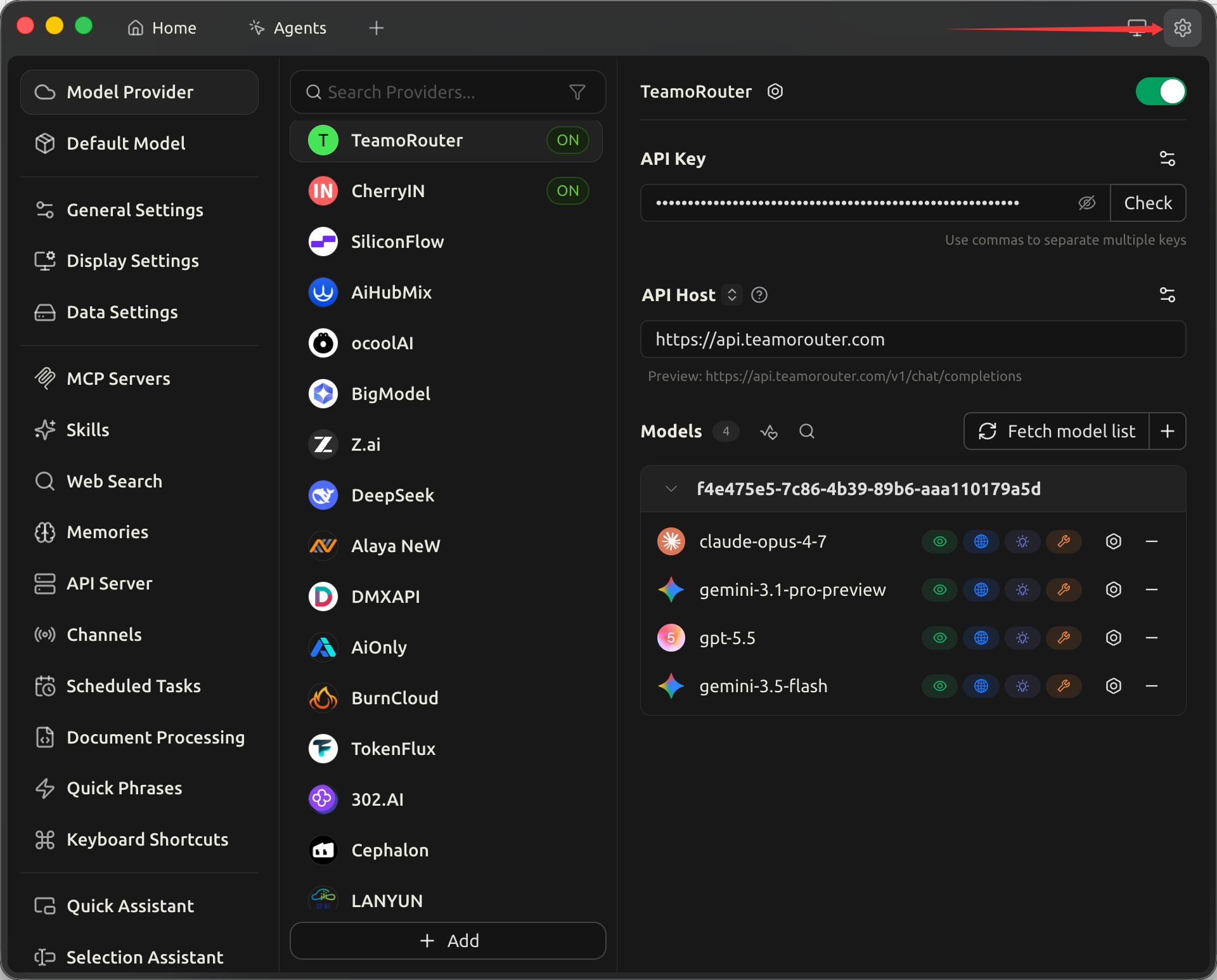
- Choose Model Services in the left navigation.
- At the bottom of the provider list, click Add to create a custom provider.
- In the dialog, fill in:
- Provider name:
TeamoRouter - Provider type: choose the provider type that matches the model family you want to use:
| Model family | Provider type |
|---|---|
| GPT | OpenAI |
| Claude | Anthropic |
| Gemini | Gemini |
| DeepSeek | OpenAI |
| GLM | OpenAI |
| Grok | OpenAI |
- After creation, fill in the provider detail panel:
- API Key: paste the key you created in the TeamoRouter dashboard. Separate multiple keys with commas.
- API URL:
https://api.agentapiai.com
Cherry Studio appends /v1/chat/completions automatically. The preview line should show https://api.agentapiai.com/v1/chat/completions.
- In Models, click Fetch model list so Cherry Studio can load all models exposed by TeamoRouter.
- Click the check button beside API Key to verify the key. If the connection succeeds, the provider is ready.
- Turn on the Enable toggle in the top-right corner of the provider panel.
2. Install Cherry Studio from scratch
Download and install
Download the installer from the Cherry Studio website:
- macOS: download the
.dmg, or runbrew install --cask cherry-studio - Windows: download and run the
.exeinstaller - Linux: download the
.AppImageor.debpackage
Configure TeamoRouter
After the first launch, follow steps 1 to 8 in the previous section.
Set a default model
In Settings, open Default Models and switch the default chat model to a TeamoRouter model such as claude-opus-4-7.
Start using Cherry Studio
Go back to Home or Agents, create a new conversation, confirm that the model picker shows your TeamoRouter model, and send a message.
Pay with USDT or USDC
You don't need a credit card to use Cherry Studio with TeamoRouter. Top up your balance with USDT, USDC or ETH straight from an exchange app (Binance, OKX and others) or any wallet: click Pay with crypto in the top-up dialog, pick a coin and network, and send. The minimum is $5 (USDT on BEP20), and no browser extension is needed. Step by step: Pay for Claude and GPT APIs with crypto (USDT).